 Writeboard
Sign in
Start free
Writeboard
Sign in
Start free
Quick start
The whole flow in six minutes, recorded from the real product and re-filmed as it changes. The steps below are the same flow in words.
For tutors
Rather watch? A lesson, clip by clip.
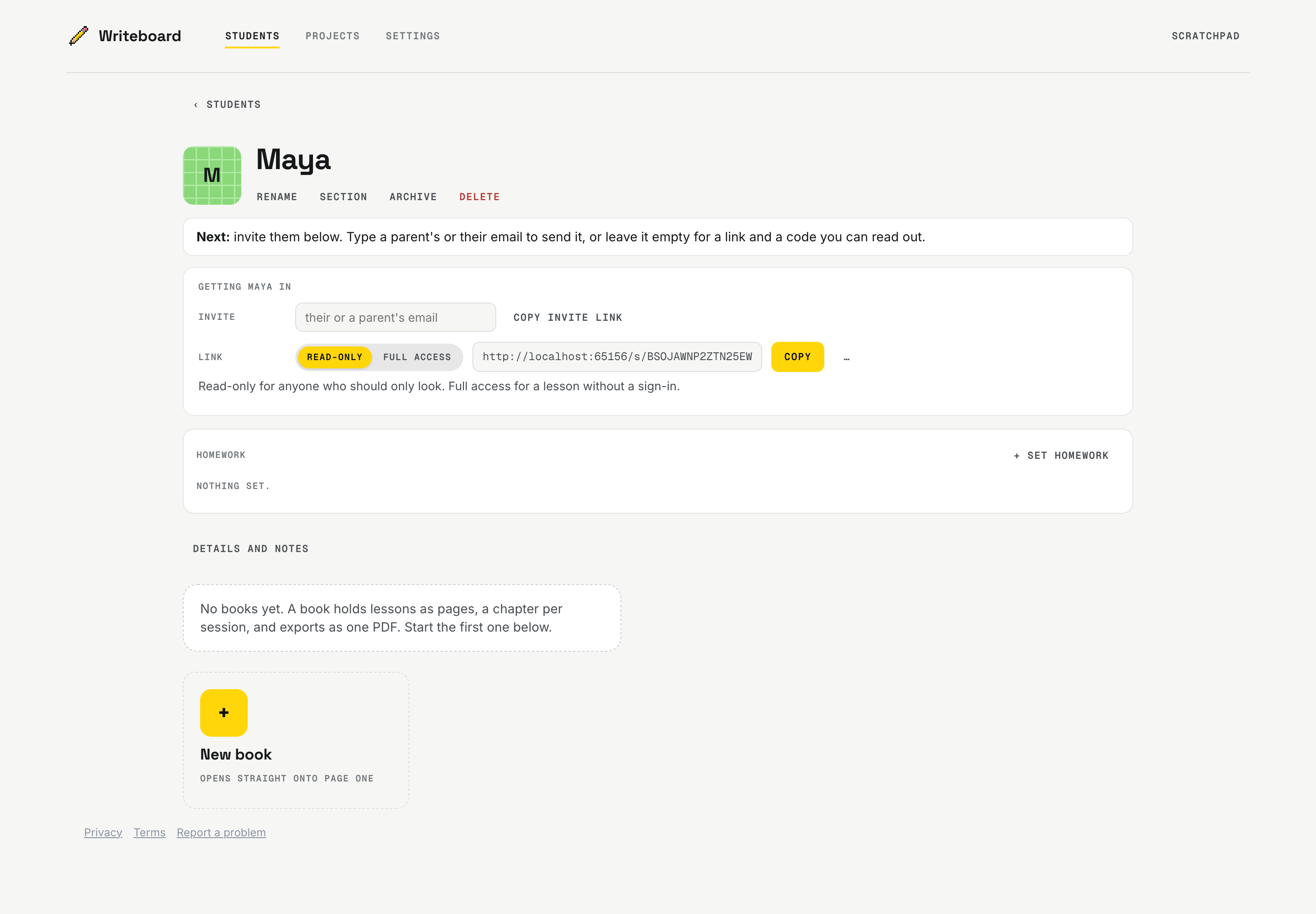
- Create a student
Open the app, add a student, and a book for your first topic.
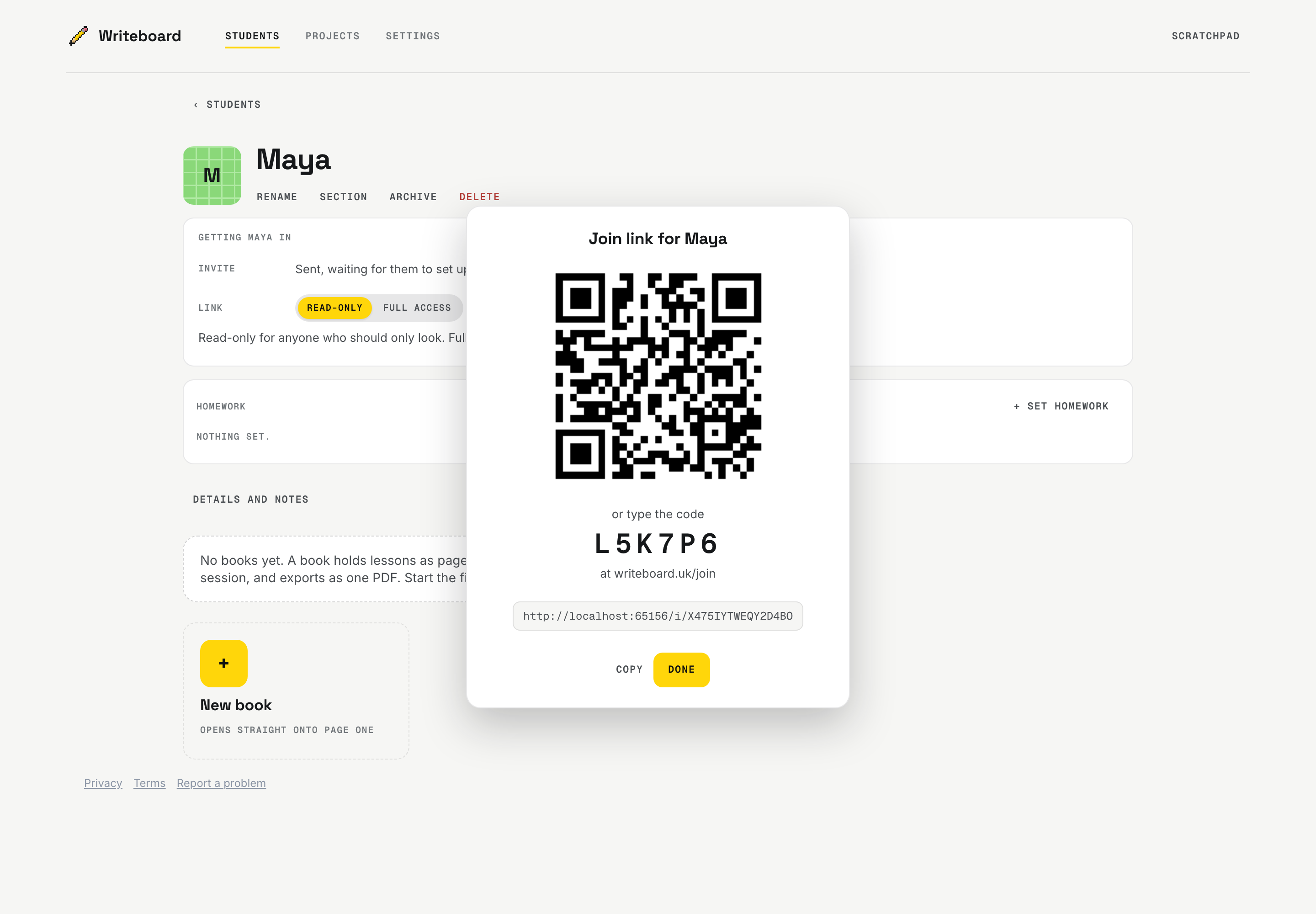
- Share their link
Copy the student link from their page and send it. They open it in any modern browser - no account needed. A parent gets a link of their own: add them on the student's page, under Parents, and it is emailed to them. It works for a year, and Renew there keeps it going. If it reaches the wrong person, they can end it from the email, and you are told.
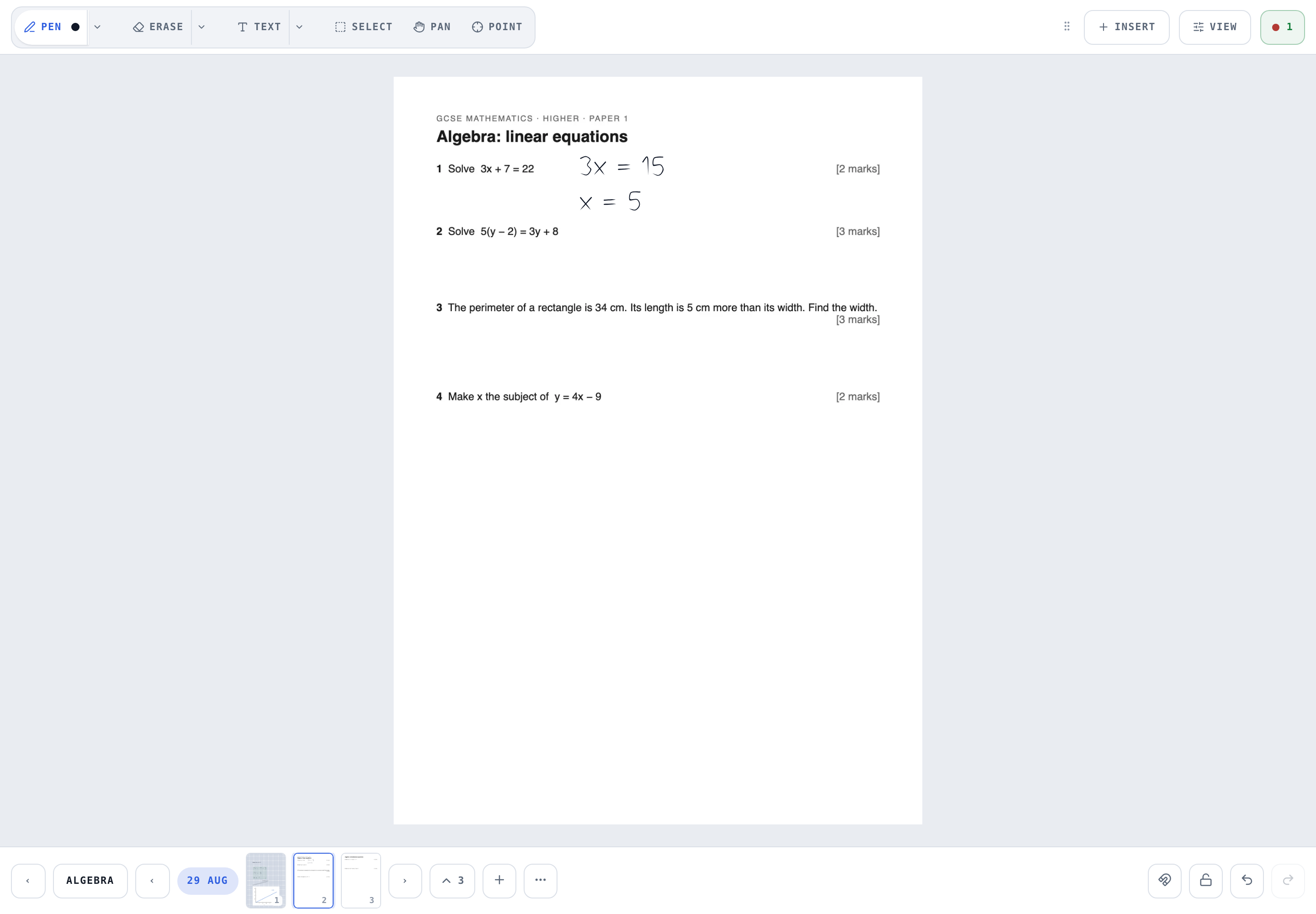
- Run the lesson
Write together in real time. Paste screenshots, or Insert a PDF past paper and pick its pages. Start each lesson's chapter from the Page menu: Today's lesson names it with the date.
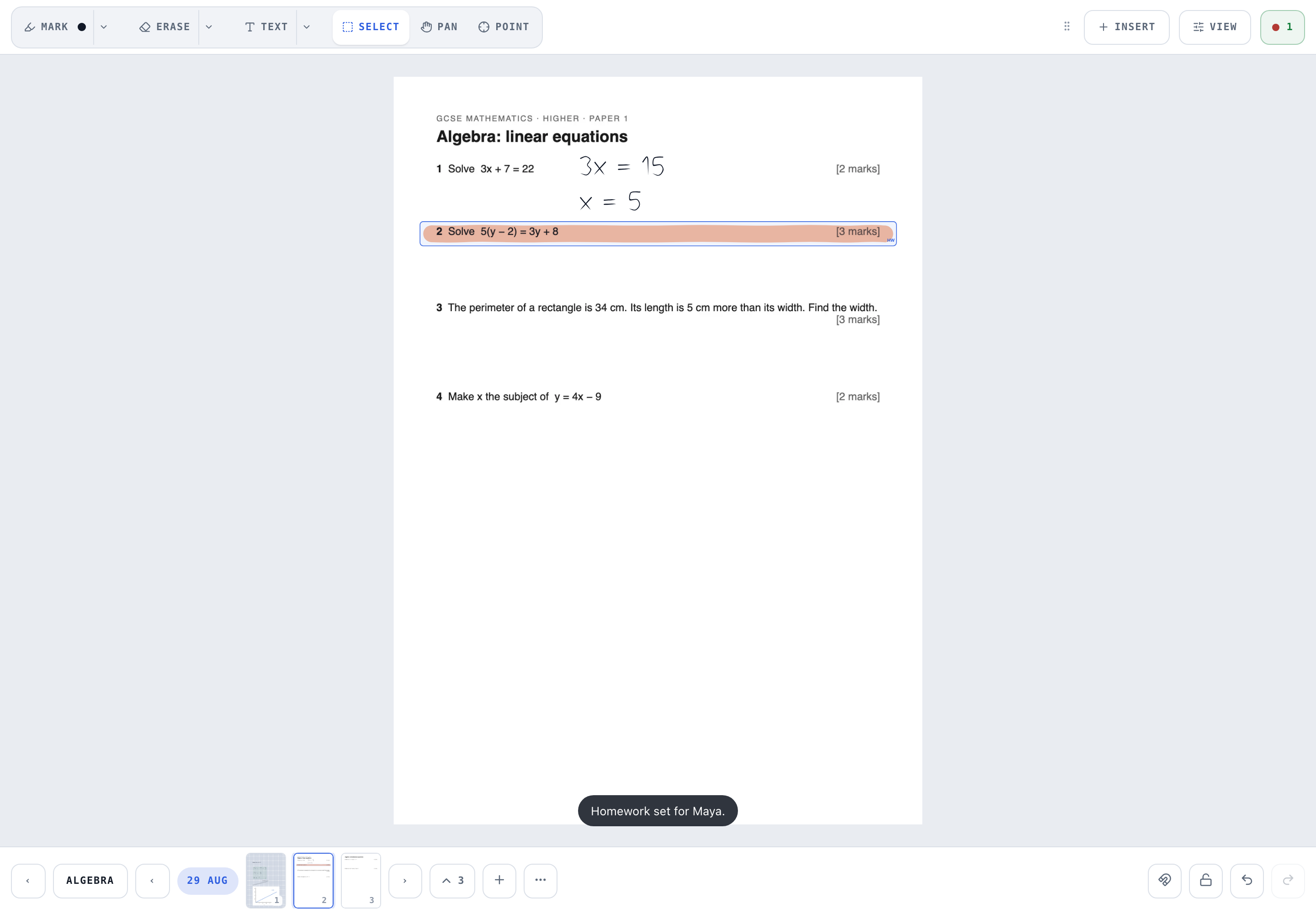
- Set homework
Draw a box round a question on the board and tap Homework: the homework panel opens beside the page. Add more boxes or whole pages, from any of their books, say what to do and set a date. Edit it from their page until it is handed in; a tick inside a part marks it.
- Mark and return
Homework shows as Started once the student writes on it. When it looks done, they are asked to hand it in. Home's To mark list holds what is handed in. Under May be done it lists what they wrote on but never handed in: mark it in for them, or leave it with Not yet. Mark handed in, on any piece, does the same, with the date and your name. A mark is optional: Confirm says it came in and you have seen it, which takes it off the list, and the student is told it was seen. For work worth a mark, Mark asks for a Result, written however you mark (7/10, 70%, B or Merit), and a comment, either or both; Return sends it back. A score in the Result goes on their Progress graph.
- Export
View then Export: the whole book, a chapter, or everything since a date, as a clean PDF. Its cover names the student, you and the dates it covers.
- Say what happened
After each lesson, answer it from Recent lessons on Home or from the lesson in Calendar: Done at the length you booked (change it there if it ran long or short; what the board saw is a note under it), No-show, or Cancelled (Cancelled and billable where you charge for late cancellations). Cancelled works as Cancel does before a lesson: it asks why, the student is told with the reason (and on a team its admins), and the notice has Undo. Parents are not emailed when a lesson is cancelled. In Calendar, What happened opens in the lesson's own panel. Done asks for a sentence on what you covered, which becomes the lesson's note for their reports, and Cancelled and billable says why it is still charged. On your own the note is optional, and Settings, A note with every lesson, makes it required; a team starts with it required. Every answer can be changed. The bell asks you to confirm a lesson the board saw, and reminds you once about one nobody has answered; nothing is marked done for you.
- Your calendar
Calendar holds your week. Add a lesson once or weekly, drag it to another day (and, in the week, to another time, in half hours; on an iPad, hold it a moment first), cancel it (before or after it starts) or put it back on, and add a key date. A drag opens the lesson with the new day and time filled in, and nothing moves until you say. Open a lesson for its main button and Actions, which holds the rest; Cancel and Delete sit under them. Delete is for a lesson added by mistake, or a weekly arrangement that ends, even after its time if it never happened: nobody is told, and a lesson that was taught, noted, invoiced or paid stays. A lesson marked done shows its note when you open it. One of your own still to come has Join the call, to the meeting link in your Settings; from half an hour before it starts, that is its main button. Times are shown in your own time zone, and a student abroad keeps theirs.
- Files and progress
Put exam papers, specifications and formula sheets on a student's shelf from their page, under Files: a PDF or a picture up to 20 MB, seen by the student and their parents. Their Progress shows lessons and homework week by week, and their Lessons download as a spreadsheet or a PDF for any period.
- Invoices, on Tutor Plus
In Invoices, in the top bar beside Calendar, switch invoicing on, set your usual rate and any student's own, and the details every invoice carries. On Tutor, Invoices shows what last month's lessons would have been as invoices, with the way to Tutor Plus. Each month, Invoices turns the lessons you answered into one invoice for each person who pays (the contact you marked as the one the bills go to), ready as a PDF to send yourself. Mark it paid, or void it and issue it again. Any one lesson can be charged or not from its panel in Calendar.
For students
Rather watch? The guide for students, and one for parents.
- Open your link
Your shelf shows your books and any homework with its due date.
- Create a sign-in if you like
A username and password (no email), so any device works without the link.
- Hand homework in
Write your answers on the homework's pages. When it looks done you are asked to hand it in, or tick each part on your shelf as you go; the last tick hands it in. It comes back Returned, with your mark or a comment. Did it on paper? Hand in still works: you are asked once, then it is in. If something is crossed, Try again sends it back to you to put right.
- Ask, and see how you are doing
Stuck on a question? Tap I'm stuck here on the page and your tutor sees where. Progress shows your lessons and homework week by week, and your own book is yours to write in between lessons.
For agencies
Rather watch? Running a team, as an admin, a coordinator and a tutor.
On the Team and Agency plans. Writeboard sets your team up with you; from then on your admins run it. The team opens on Today: the day's lessons and who is teaching them, and one To do list with its button on every line, from finding cover and answering a lesson nobody answered to an enquiry or a student with no tutor. The figures are under Reports, Figures. The team's Settings is in areas: Plan, Look, Lessons, Powers, Switches, Your data and Close.
- Your people
Admins add people from People: an admin, a coordinator or a tutor. Each says yes from their own Home before they join. A coordinator runs students and their families and, unless the team switches it on, sees the counts rather than the work. Admins can give coordinators more, for all of them under Settings, Powers or for one on their page: every student, choosing who teaches, enquiries, inviting tutors, tutor pay, reporting rounds, the team's documents and its look. The plan, the switches, your data and closing the team stay with the admins. What a tutor may do (add lessons, move or cancel their own, add and remove their own lessons, pick up cover) is set by the team.
- Students and their tutors
Add a student, or import a list from a spreadsheet, and assign their tutors: on the list, tap a tutor to change who teaches, or + to add one, and Choose to assign several at once. Each student has one page: their card, homework, books, files, record and lessons. Offboarding, from Leaving the team on that page, makes everything read-only for 30 days, then removes it. A tutor's book opens to an admin as its numbers first; Open full book asks why and for a fresh code, tells the tutor, and keeps it open for two hours. A coordinator the team gives the work does the same.
- The week and cover
Calendar shows the team's week. A tutor who cannot make a lesson asks for cover; an admin hands it to someone by name, or offers it to every tutor who may take one, who see the time but never the student. Term dates and holidays empty the calendar for everybody.
- Reports, in rounds (Agency)
In Reports, under Rounds, Open a round: a name, the lessons it covers and a due date. That night each student's report is drafted from their lessons and homework, and their tutors are told; the round shows who has finished, and tutors are reminded a week before and on the day. A report template in Documents sets the headings and can start every report with your own paragraph. Each student's pack (the report, their dates to come and the lessons) downloads as a PDF, or every pack as one for a parents' evening.
- Invoices (Agency)
Switch on Invoices, and Tutor pay if you want it, in the team's Settings. Invoices, in the top bar, then holds the Rates (a standard, and each student's own, also set from their page), the Details printed on every invoice, and Invoices: pick a period, and the lessons answered become one invoice per person who pays, to issue, download, mark paid or void. It opens on last month in a month's first week and on this month after that. A lesson nobody has answered is held, never dropped, and an admin answers it right there: Done, No-show or Other. Tutor pay shows what each tutor is owed, with a payroll spreadsheet; a tutor sees only their own, in Settings, Profile. A coordinator sees the money of the families they run. In the first week of a month the bell says last month's invoices are ready.
- Enquiries (Agency)
Switch on Enquiries and Settings gives you a form's link to put on your website. A parent leaves their details, their child's year and subjects and when they are free; it lands under Students, Enquiries, with how many are waiting, and on Today, and Make a student adds the child with that parent as the one the bills go to. Enquiries that go nowhere are deleted after 90 days.
- Switches and your data
Every feature a team might not use is a switch in Settings, and off means nothing of it shows. Lessons, homework and term reports download as spreadsheets. Your data in Settings takes everything the team holds as one zip: tick what you want, students and money, books as PDFs, files as uploaded.
Good to know
The first time you open a page with a guide, it shows you round, one control at a time; Skip ends it. Show me around, in your account menu or under Tools on the board, brings it back, and Show every guide again in Settings brings them all back.
Key dates (mocks, exams, deadlines) go on a student's card with Add a date, and show on Home, the calendar and the lesson chip. They are shared with the student and their parents unless you keep one to the tutors.
Everything you hold here can be taken away as one zip from Your data in Settings: your students' books as PDFs, their homework, lessons and record as spreadsheets, and their files as uploaded. It is built on your device, and a tutor's private notes are never in it.
When a team stops, its admin closes it from Close this team in Settings. For 30 days everything is read-only for everyone and Your data still works; it can be reopened at any time until then, and after that everything is erased. Take your invoices first: we keep no copy.
A sign-in you stop using ends by itself: after 7 days unused, or after a day if you run a team as its admin or coordinator. Sign in again and everything is as you left it. A student's own sign-in is not affected. Before a team's Export everything or its Your data pack, erasing a student, or deleting your own account, it asks for a fresh code, from your authenticator app or one we email you, so a computer left signed in cannot do any of them. Deleting your account, under Settings, puts everything in the bin for 30 days; after that it goes for good, your invoices with it, and Writeboard keeps no copy, so download any you must keep first.
If Writeboard support ever opens a student's pages or your account to answer a request, you are told on your bell, and a team sees it in its activity.
Deleted pages restore from the Page menu on the board. Deleted books and students wait 30 days in Settings, Bin. Everything works on iPad with the Apple Pencil, including palm rejection; a toggle chooses whether a bare finger writes or pans.
Coming soon, for agencies connecting their own systems, on the Agency plan: the Team page's Connect
area will mint API tokens (read your lessons, homework and student list at /api/v1/…)
and webhooks announcing lesson.completed (confirmed by the tutor, with its
length), lesson.cancelled, lesson.unconfirmed and
homework.handed_in as they happen, each delivery signed with a
shown-once secret. Lesson records themselves begin 6 September 2026.
Available today: lessons and term reports download as CSV (each lesson
in its own time zone, stable columns) and everything exports whole as JSON; the column
contract lives in the repository at
docs/integrations/EXPORT-SCHEMA.md and breaking it fails our
own build before it can break your spreadsheet.
Writeboard needs Safari or iOS 16.4 or newer, or a Chrome, Edge or Firefox from 2023 on, and this is tested rather than hoped: the suite runs on all three browser engines, on tablet and phone screens, before every release. An older browser gets a plain message saying so instead of a blank page.
The bell at the top of every page hears hand-ins, new sign-ins and homework due tomorrow. Settings chooses what reaches it, and whether one email a day follows after seven. Students have a bell of their own for new homework and marks.