 Writeboard
Sign in
Start free
Writeboard
Sign in
Start free
For maths tutors
A whiteboard built by a maths tutor, for maths lessons
Writeboard is a shared A4 whiteboard where the working is written by hand on squared paper, the past paper sits under the pen, and the homework is the question you boxed. It exists because I could not find one that did all three for less than the price of a coffee a week.
Updated 30 September 2026. Written by a working tutor from his own lessons; every screen shown is the real product.
The short answer
Squared, graph and isometric paper. Pencil handwriting with pressure and palm rejection. Past papers imported as pages under the ink. A protractor, x-y axes and a grapher that draws y = x squared minus 2, and a scientific calculator that writes its working onto the page. Draw a box round a question, then tick it or set it as homework. A term exports as one PDF. Free for two students; £6 a month after, or £5 a month paid yearly.
Squared paper that stays put
Fixed A4 pages with squares, graph axes, dots or isometric. They print and export exactly as written.
Working in your own hand
Built for the Apple Pencil first: pressure, instant strokes, palm rejection that survives real handwriting.
Past papers under the ink
Import the board's PDF, pick the questions, write over them. Clear the ink and the paper is still there.
Instruments
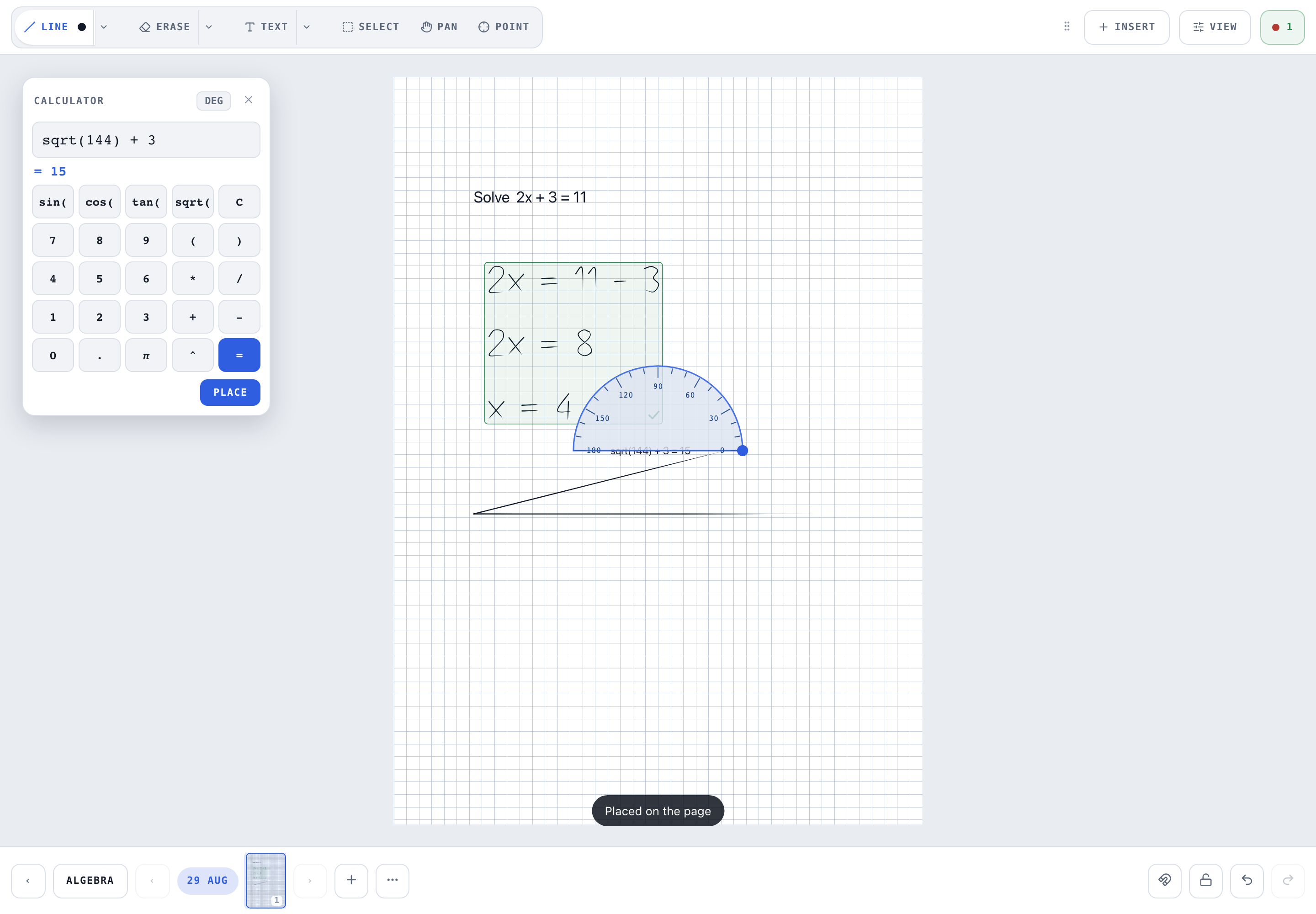
A line tool that snaps to the horizontal and to 45 degrees, a draggable protractor, and a scientific calculator with a Place key that writes the steps onto the page.
Axes and graphs
Drag out x-y axes with ticks and arrowheads, a number line or a unit circle, all as ordinary ink that erases and exports like handwriting. Type y = x^2 - 2 and a range, drag a box, and the curve is drawn over its axes.
Marking on the page
Box the working, tick or cross. The mark shows on the student's shelf and in the export.
Homework is the question
Box it, tap Homework, set the date. The student ticks it off part by part; your tick inside it adds to the score.
Teaching over Zoom, Meet or Teams
Keep the call you already use. Writeboard is the whiteboard beside it, not a replacement for it. The student opens the same board on their own device with their own sign-in, so you both write on the page: no screen sharing, no lag behind a shared screen, and the lesson is in their book when the call ends.
Put your meeting link in Settings once and every student has a Join button on their board and their shelf. The usual set-up is the call on a laptop or phone and the board on an iPad with a pencil; one laptop with both side by side works too. If you want the call inside the whiteboard itself, BitPaper does that and we say so on the comparison.
A lesson, start to finish
- Open the book
One book per topic or per term; tap Chapter and today's date names the lesson.
- Warm up on squared paper
Type the question with the text tool, write the working by hand, box it, tick it.
- Import the paper
Insert, Import a PDF as pages, tick the questions you want.
- Point, then write
The laser points without marking. Then work the question on the paper.
- Set the homework
Box the next question, Homework, due date.
- Export when a parent asks
The chapter, or the term, as one PDF with cover and contents.
Questions maths tutors ask
Does Writeboard have squared paper?
Yes. Page templates include ruled, squared, graph with axes, dotted and isometric, chosen per page or per book.
Is there a calculator on the board?
A scientific calculator with a Place key that writes the working and the result onto the page in the same hand as the rest of the lesson, so the student sees the steps.
Can I draw straight lines and angles?
A straight-line tool and a draggable protractor are built in. Lines snap straight; the protractor sits over the drawing and turns.
How do I mark a student's working?
Select tool, box it, tick or cross. Marks show on the page and on the student's shelf, and export with the PDF.
Do I still need Zoom?
Yes, or Meet, Teams, FaceTime or WhatsApp: Writeboard is the whiteboard, not the call. Keep the call you already use. Put your meeting link in Settings once and every student gets a Join button on their board and their shelf, so nobody hunts for the link.
Can I teach from one laptop, with Zoom and the board side by side?
Yes, it works in any browser beside the call. Most maths tutors find it easier with the call on a laptop or phone and the board on an iPad with a pencil, because handwriting is faster than a mouse and the call survives if the board is reloaded.
Do I have to share my screen?
No. The student opens the same board on their own device, with their own sign-in, and you both write on it. Nothing to share, nothing lagging behind a screen share, and their work is in their book afterwards.