 Writeboard
Sign in
Start free
Writeboard
Sign in
Start free
Guide
Past papers on an online whiteboard
The most useful hour in exam tutoring is a past paper done together and marked on the spot. Online, that needs the paper under the pen, not a screenshot pasted on a canvas. Here is how it works, and the copyright position in plain words.
Updated 9 October 2026. Written by a working tutor from his own lessons; every screen shown is the real product.
The short answer
Download the PDF from the exam board, import it as pages, write over it, box and tick the working, set the next question as homework, export the chapter. Six steps, about two minutes of set-up per paper.
Step by step
- Download the paper
Exam boards publish past papers and mark schemes as PDFs on their own sites. Save the PDF to the device you tutor from.
- Import it as pages
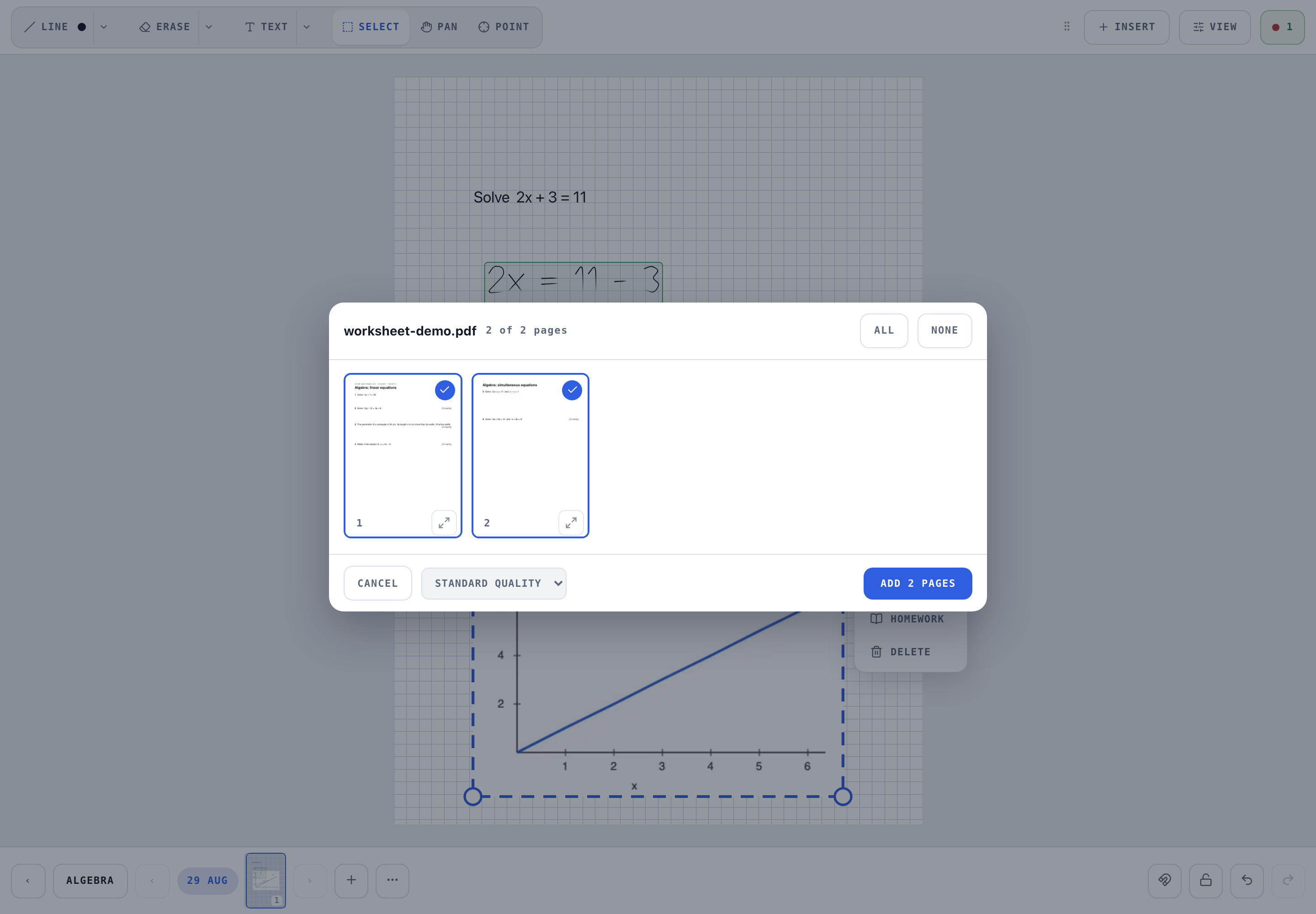
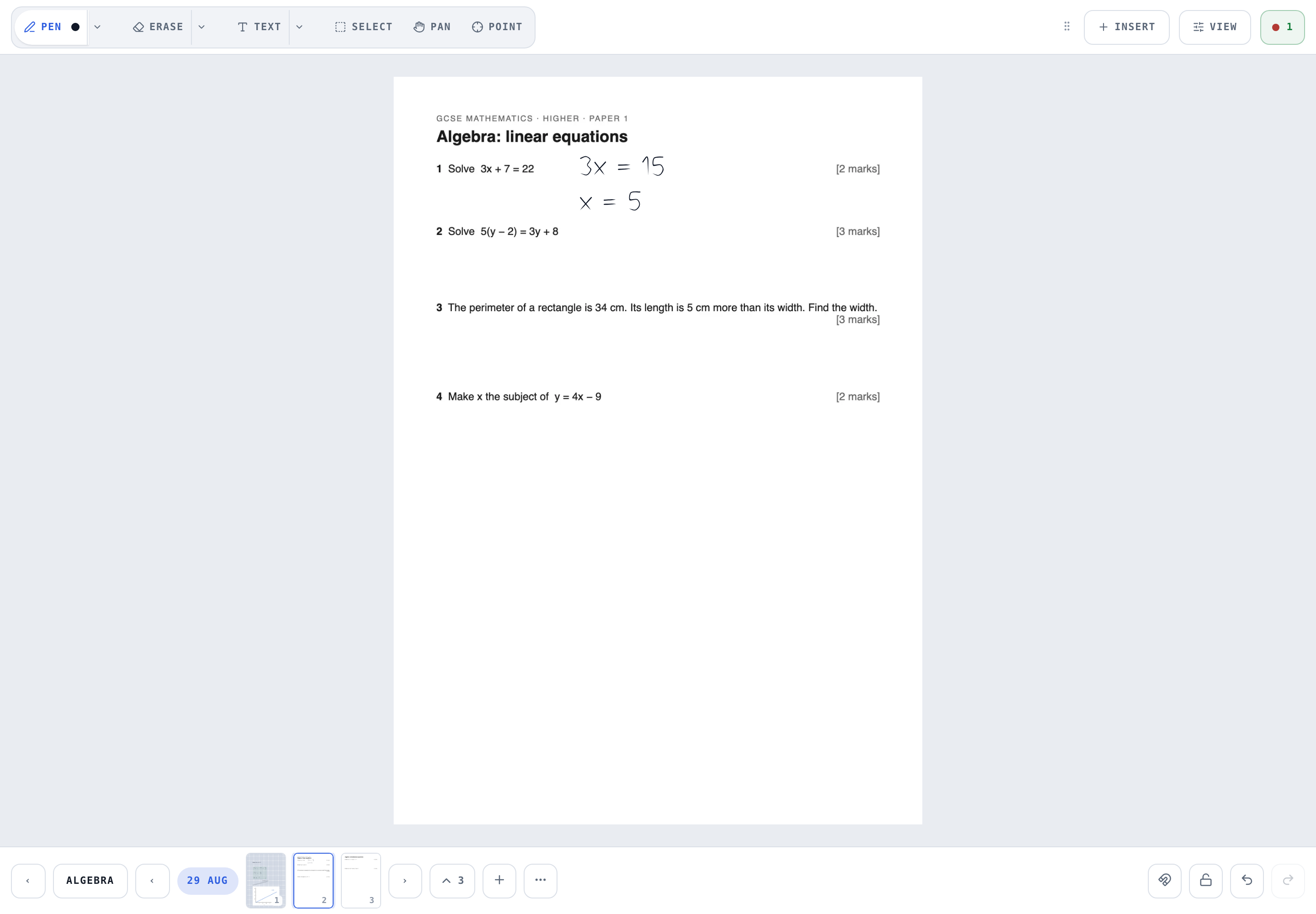
On the board: Insert, then Import a PDF as pages. A preview shows every page; tick the ones you want. They become pages in the current chapter with the paper fixed under your writing.
- Work on the paper
Write over the questions in your hand. The sheet never moves. Clear the ink and the paper is still there for a second attempt.
- Mark it
Select tool, box the working, tick or cross. The mark shows on the page and on the student's shelf.
- Set the rest as homework
Box the next question, tap Homework, set the date. The student's shelf shows it as a picture and opens on the spot.
- Export the attempt
View, then Export: this chapter as one PDF with the paper, the working and the marks, to send to a parent or keep.
Where to find papers
Start with the exam boards. Each publishes its own past papers and mark schemes free, though the most recent series is usually held back for schools for a while so it can be used for mocks:
Three free sites tutors lean on every week, and that we send people to ourselves:
- Physics & Maths Tutor: past papers, exam questions by topic, revision notes and worksheets for GCSE, IGCSE and A level, across maths, the sciences and more.
- Maths Genie: free GCSE and A level maths revision.
- Corbettmaths: maths videos, worksheets, practice papers and the 5-a-day.
We are not connected to any of them; we link them because they are where tutors go. Download the paper from the source, then import it as above, and the board's own terms apply to how you use it.
Copyright, plainly
An exam paper belongs to the board that set it. Using it with your own student in a private lesson is the tutor's responsibility, exactly as it is when you print one. Writeboard stores the pages for you and the people you give access to, never publishes them, and removes material if a rights holder asks. If a board's terms require a licence for commercial tutoring, that licence is yours to hold. Our terms say the same in more words.
Questions tutors ask
Can I legally use past papers on an online whiteboard?
Past papers are the exam board's copyright. Using one with your own student on a private board is your responsibility as the tutor, in the same way as printing it for a face-to-face lesson; Writeboard never publishes or shares it beyond the people you give access to, and removes material if a rights holder asks. The boards' own terms say what they permit; most allow non-commercial educational use and some require a licence for commercial use. Check the board you use.
Does the PDF stay under the ink when I clear the page?
In Writeboard, yes. The imported page is a locked sheet under the ink layer. Clear removes the writing and keeps the paper.
Can I import only some pages of a paper?
Yes. The import preview shows every page and you tick the ones you want, so a 24-page paper can become the three questions you are working on.
How do I share the marked paper with a parent?
Export the chapter as a PDF, or give the parent the read-only link to the student's book; they see the pages as they are, without being able to write.