 Writeboard
Sign in
Start free
Writeboard
Sign in
Start free
For physics tutors
A whiteboard for physics lessons, built by a physicist who tutors
I am an astrophysics researcher who tutors, and physics is mostly two things on paper: rearranging an equation and reading a graph. Writeboard does both on real A4 pages: the working in your own hand, the graph drawn from its equation, and the lesson kept in a book the student takes away.
Updated 3 October 2026. Written by a working tutor from his own lessons; every screen shown is the real product.
The short answer
Squared and graph paper. Handwriting with an Apple Pencil, pressure and palm rejection. A graph plotter that takes the equation, sin and ln included. A scientific calculator that writes its working onto the page. A straight-line tool and a protractor. Past papers imported as pages under the ink. Box a question, tick it, or set it as homework. Free for two students; £6 a month after, or £5 a month paid yearly.
Graphs from the equation
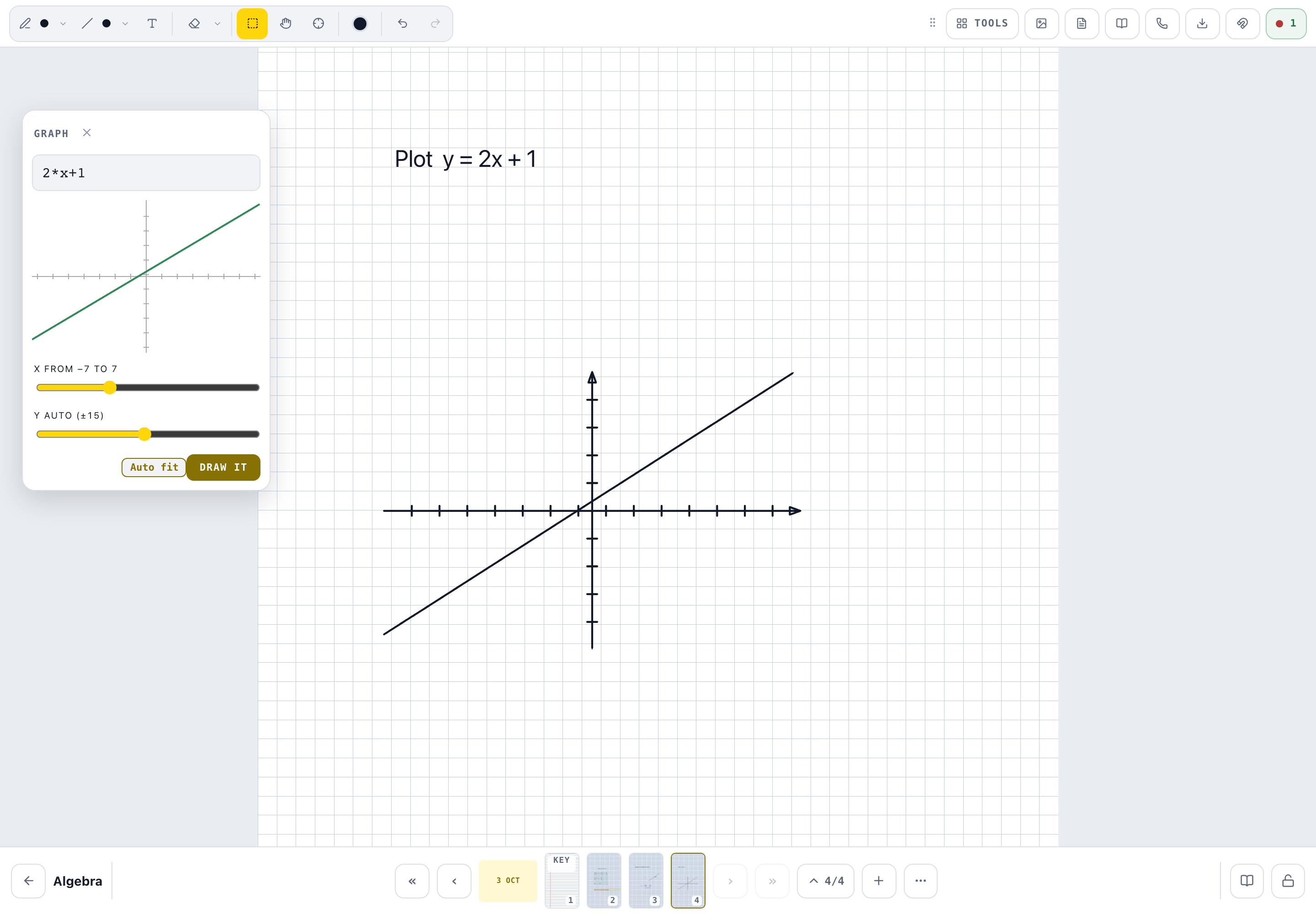
Type y = 5*sin(x) or y = 100*e^(-0.5x), choose the range, and the curve is placed over its own axes, as ink that exports with the page.
Rearranging, by hand
The working is written, not typed: one line per step on squared paper, the way an exam wants it shown.
A calculator that shows its working
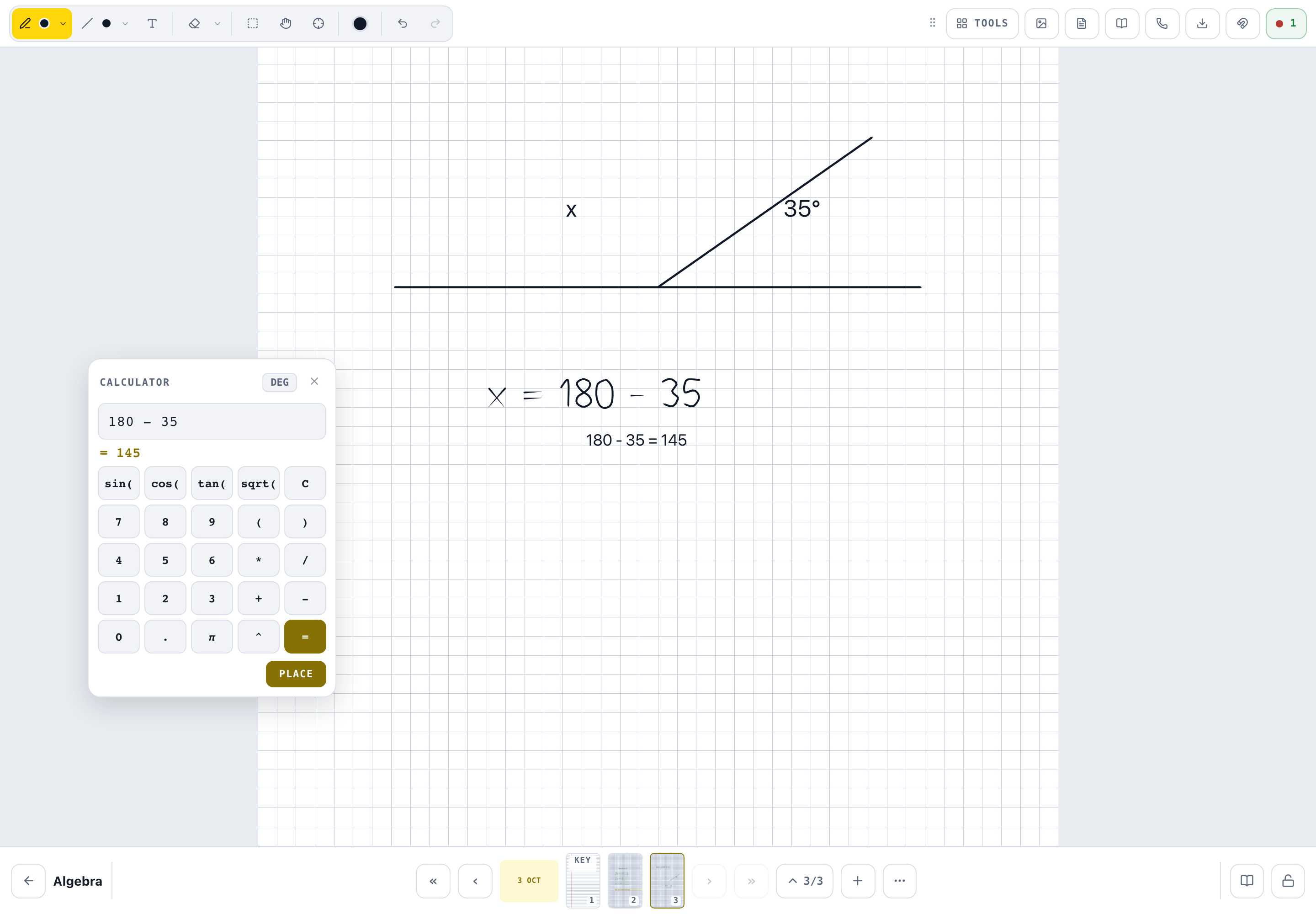
A scientific calculator with a Place key: the sum and its answer land on the page beside the working, so the student sees where the number came from.
Lines and angles
A straight-line tool that snaps to the horizontal and to 45 degrees, and a protractor that turns over the drawing.
Past papers under the ink
Import the PDF, pick the questions, write over them. Clear the ink and the paper is still there.
Homework is the question
Box it, tap Homework, set the date. The student ticks it off part by part, and the marks add up.
What it does not do
There are no circuit symbols, no optics or vector tools beyond the straight line and the protractor, and no simulations. Draw a circuit by hand on squared paper, or paste a screenshot of one, lock it, and write over it. If your lessons live on simulations, Writeboard is the page you write the working on beside them.
Teaching over Zoom, Meet or Teams
Keep the call you already use; Writeboard is the whiteboard beside it. The student opens the same board on their own device with their own sign-in, so you both write on the page, and the lesson is in their book when the call ends. More on this on the maths page.
A lesson, start to finish
- Open the book
One book per topic; tap Chapter and today's date names the lesson.
- Set the question
Type it with the text tool, units and all, so the page says what is being worked out.
- Rearrange by hand
Write the working on squared paper with the pencil, one line per step.
- Let the calculator place the number
Do the arithmetic on the calculator and Place it: the working and the answer land on the page.
- Plot it
Type the equation, choose the range, place the graph beside the working.
- Set the homework
Box the next question, Homework, due date. Their tick comes back to your bell.
Questions physics tutors ask
Can I plot a graph from an equation?
Yes. Type y = f(x) and a range, watch the curve preview, and place it over its own axes. It understands sin, cos, tan, sqrt, ln, log, abs, pi and e, so a wave, a decay curve or an inverse square is one line.
Can I draw circuit diagrams?
Not with symbols: there are no circuit symbols. Draw the circuit by hand on squared paper, or paste a screenshot of one and lock it under the ink so you can write on it.
What about ray diagrams and vectors?
The straight-line tool snaps to the horizontal and to 45 degrees, and the protractor sits over a drawing and turns. That covers angles of incidence and resolving a force; there is no dedicated optics or vector tool.
Can I use past papers?
Import the PDF as pages, pick the questions, and write over them. The paper stays under the ink, and the homework can be the question you box.
Do I still need Zoom?
Yes, or Meet, Teams, FaceTime or WhatsApp. Writeboard is the whiteboard beside the call, not the call. Put your meeting link in Settings once and every student gets a Join button.
What does it cost?
Free for two students, for as long as you like. After that £6 a month for twenty students, or £5 a month paid yearly.